Cybersecurity Basics Every Kenyan SME Should Have in Place
 Blessedave Technologies 4 min read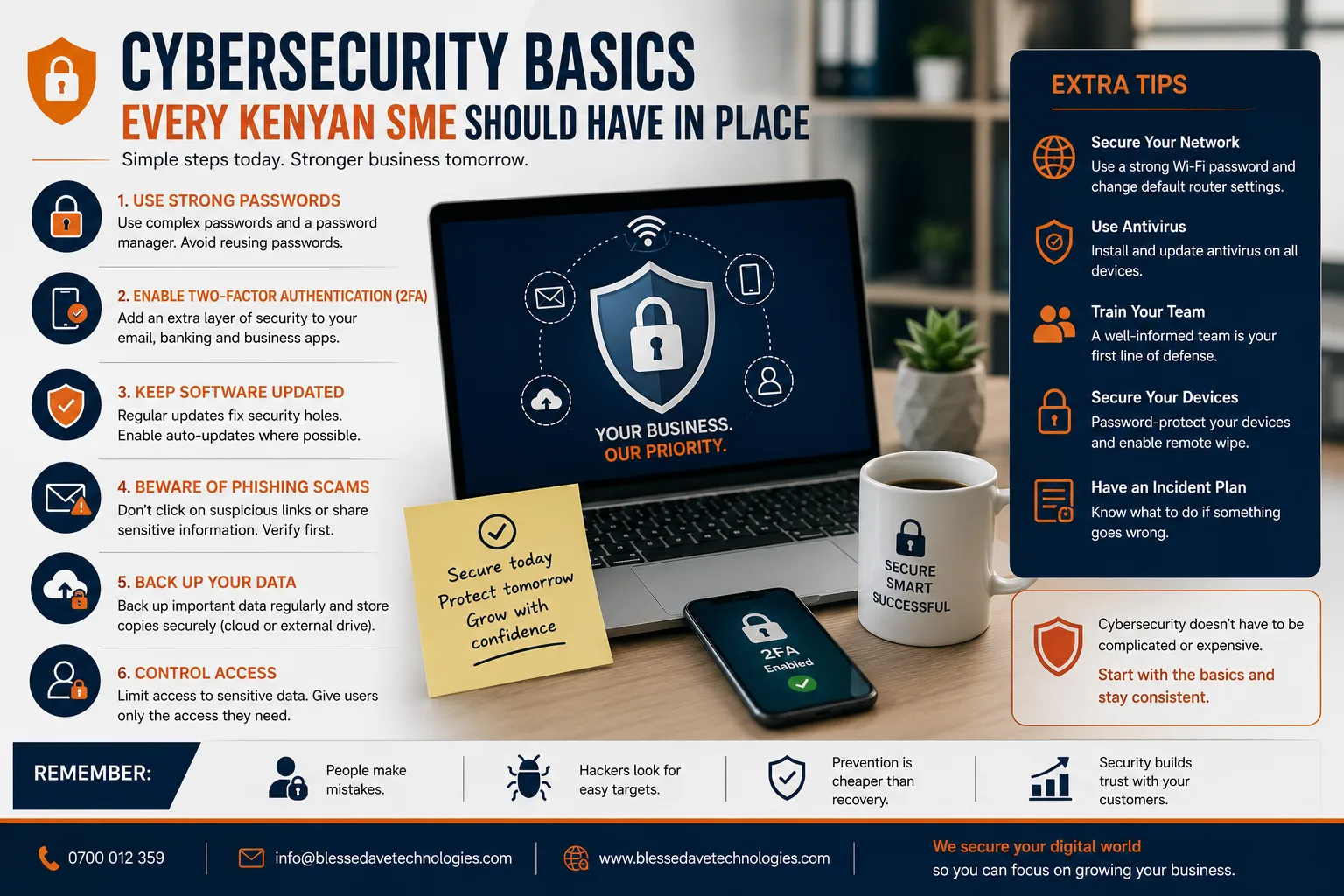
On this page
Many small and medium businesses assume cyberattacks are a problem for large corporations with valuable data to steal. In reality, SMEs are frequently targeted precisely because they tend to have weaker security than large enterprises, while still holding customer data, financial information, and payment access worth stealing. A single security incident — a compromised email account, a ransomware attack, a leaked customer database — can be financially and reputationally devastating for a business without the resources of a large corporation to absorb the impact.
The good news: strong cybersecurity for an SME doesn't require an enterprise-level budget. Here are the practical basics every Kenyan business should have in place.
Why SMEs Are Common Targets
Attackers often specifically target smaller businesses because they typically have fewer dedicated security resources, less sophisticated monitoring, and staff who may not be trained to recognize common attack methods — making them, on average, easier targets than large enterprises with dedicated security teams, even though any individual attack might yield less money than targeting a larger company.
The Basics Every Business Should Have
1. Strong, Unique Passwords and a Password Manager
Reused or weak passwords remain one of the most common ways accounts get compromised. Using a password manager to generate and store strong, unique passwords for every business account removes the temptation to reuse simple passwords across multiple systems.
2. Two-Factor Authentication (2FA) Everywhere Possible
Enabling 2FA on email, banking, social media, and business software accounts adds a critical second layer of protection — even if a password is compromised, an attacker still can't access the account without the second verification step.
3. Regular Software Updates
Outdated software — operating systems, website platforms, plugins, business applications — is one of the most common entry points for attackers, who actively scan for known vulnerabilities in unpatched systems. Keeping everything updated closes this door before it's exploited.
4. Employee Awareness Training
Many successful attacks succeed not through sophisticated technical exploits, but through simple human error — clicking a phishing link, opening a malicious attachment, or being socially engineered into revealing sensitive information. Basic, periodic staff training on recognizing these attempts significantly reduces this risk.
5. Regular, Verified Backups
Reliable, regularly tested backups — stored separately from your primary systems — ensure that even in the worst-case scenario (a ransomware attack, hardware failure, accidental deletion), your business data can be restored without paying a ransom or losing critical information permanently.
6. Secure Website Practices
For any business with a website — particularly one handling customer data or payments — proper security measures (HTTPS/SSL encryption, secure hosting, regular security patches, avoiding storing sensitive data unnecessarily) are essential baseline protections, not optional extras.
7. Limited Access Based on Role
Not every staff member needs access to every system or piece of data. Limiting access based on actual job requirements — sometimes called the principle of least privilege — reduces the potential damage if any single account is compromised.
8. A Basic Incident Response Plan
Knowing in advance who to contact, what steps to take, and how to communicate with customers if a security incident does occur significantly reduces panic and confusion in the moment, and can meaningfully limit the damage compared to reacting without any plan.
9. Secure Payment Handling
Businesses accepting online payments should rely on reputable, PCI-compliant payment gateways rather than building or handling payment processing independently — reducing both security risk and regulatory compliance burden considerably.
10. Email Security Practices
Business email accounts are a particularly common attack target, given how much sensitive communication and account-recovery access typically flows through them. Strong, unique passwords, 2FA, and staff awareness of phishing tactics specifically targeting email are especially important here.
Common Warning Signs of a Security Issue
- Unexpected password reset emails or login notifications from unfamiliar locations
- Unusually slow systems or unexpected pop-ups
- Customers reporting suspicious communications appearing to come from your business
- Unexplained changes to website content, files, or settings
- Unusual account activity or unfamiliar transactions
What to Do If You Suspect a Breach
- Change passwords immediately for any potentially affected accounts, starting with email and financial systems
- Enable or verify 2FA on all critical accounts if not already active
- Isolate affected systems where possible to prevent further spread
- Notify affected customers or partners promptly and transparently if their data may have been compromised
- Engage a professional for anything beyond basic remediation — attempting to handle a serious breach without appropriate expertise can worsen the situation
Building Security Into Your Business From the Start
Rather than treating cybersecurity as an afterthought addressed only after an incident, businesses that build these basics into their operations from the start — proper password practices, regular updates, staff awareness, reliable backups — face significantly lower risk and recover more easily from any issues that do arise.
Build a More Secure Foundation With Blessedave Technologies
At Blessedave Technologies, we build websites and business systems with security considered from the start — secure hosting, proper encryption, regular updates, and reliable backup practices — helping Kenyan SMEs protect their data and their customers' trust.
Talk to us about strengthening your business's digital security at blessedavetechnologies.com.
FAQ
Frequently asked questions
Are small businesses really at risk of cyberattacks, or is this mainly a concern for large companies?
Small businesses are frequently targeted specifically because they tend to have weaker security than large enterprises, making them comparatively easier targets even though individual attacks might yield less money than targeting a larger company.
What's the single most important cybersecurity step for a small business to take?
Enabling two-factor authentication across critical accounts (email, banking, business software) is one of the highest-impact, lowest-cost steps available, since it protects accounts even if a password is compromised.
How often should business software and systems be updated?
As soon as updates become available, ideally — outdated software is one of the most common entry points attackers exploit, since it often contains known, publicly documented vulnerabilities.
Do employees really need cybersecurity training, or is technical protection enough?
Yes, training matters significantly — many successful attacks succeed through human error, like clicking a phishing link, rather than purely technical exploits, making staff awareness a critical layer of protection.
How often should a business back up its data?
This depends on how frequently critical data changes, but regular, automated backups — verified periodically to confirm they actually work — are essential, since backups that were never tested can fail exactly when they're needed most.
What should a business do immediately if it suspects a security breach?
Change passwords for potentially affected accounts, verify or enable two-factor authentication, isolate affected systems where possible, and engage a professional for anything beyond basic remediation.
Written by
Blessedave TechnologiesEditorial team
The Blessedave Technologies team designs and builds websites, custom software, e-commerce systems and SEO/AEO programmes for businesses in Nairobi and across Kenya.
Comments
No comments yet. Start the conversation.