WhatsApp Business API vs the Regular App: What's the Difference?
 Blessedave Technologies 4 min read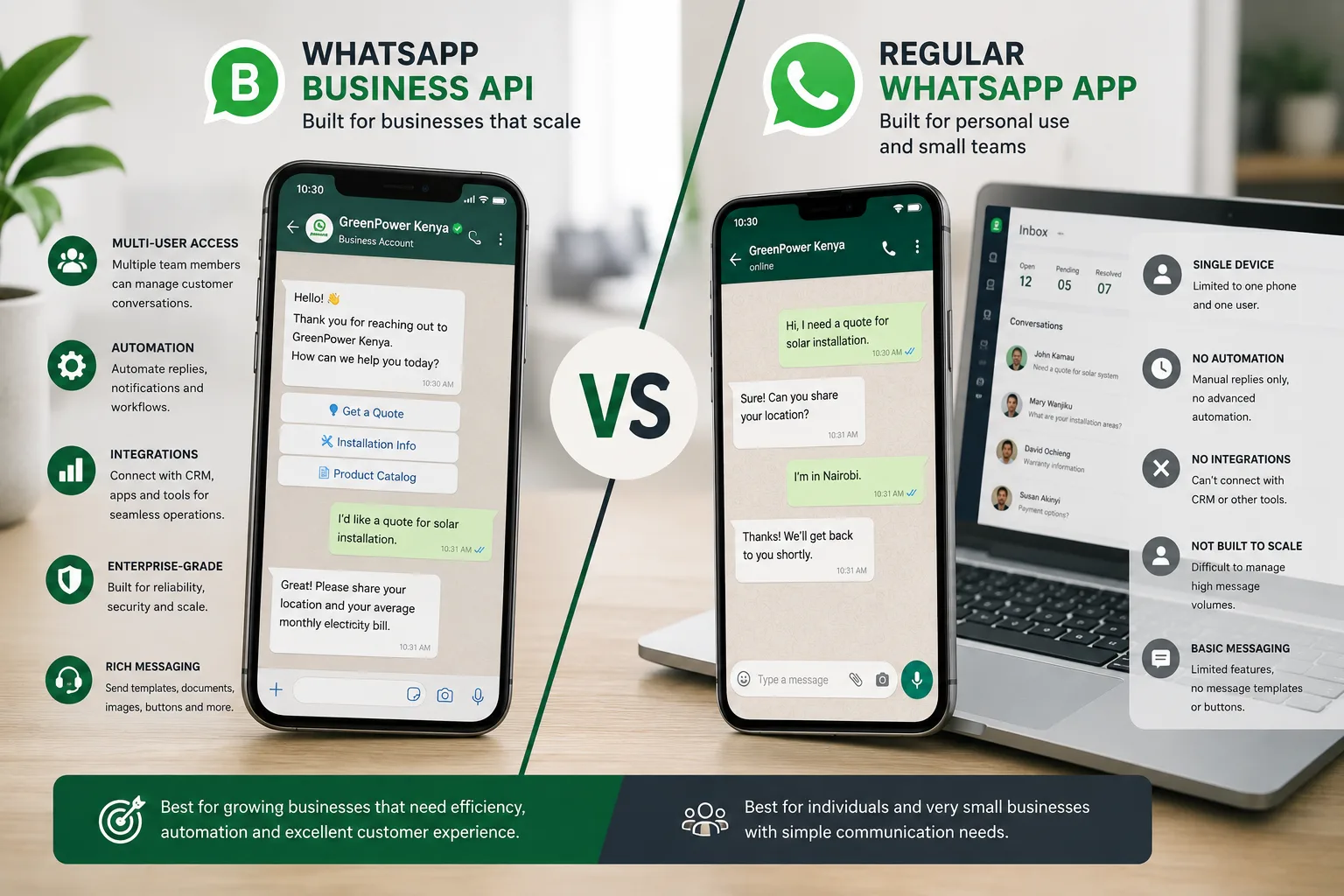
On this page
WhatsApp is often the primary channel Kenyan customers use to reach a business — sometimes even ahead of a phone call or website contact form. Most small businesses start with the free WhatsApp Business App, and that's genuinely the right choice at first. But as message volume grows, businesses often hit real limitations that push them toward the WhatsApp Business API instead. Here's what actually differs between the two, and how to know when it's time to make the switch.
What Is the WhatsApp Business App?
The WhatsApp Business App is a free, downloadable app — essentially a business-oriented version of regular WhatsApp — designed for small businesses managing customer communication directly from a phone. It includes basic business features: a business profile, catalog display, quick replies, and simple away messages.
Best suited for: Solo entrepreneurs and small businesses handling a manageable volume of customer messages personally, without needing automation or multiple team members accessing the same number simultaneously.
What Is the WhatsApp Business API?
The WhatsApp Business API is a different, more powerful system designed for larger-scale, more automated business communication. Unlike the app, it's not something you download and use directly — it requires integration through an approved provider (Meta-approved Business Solution Providers) and is typically connected to other business systems like a CRM, chatbot, or customer support platform.
Best suited for: Growing businesses needing multiple team members to access the same WhatsApp number simultaneously, automated responses at scale, integration with other business tools, and significantly higher message volumes than the app can practically handle.
Key Differences
Multiple User Access
The app is fundamentally built for single-device use (with some limited multi-device support), making it difficult for a growing customer service team to collaborate on the same number. The API supports multiple team members and systems accessing the same business number simultaneously, which becomes essential once message volume exceeds what one or two people can manage manually.
Automation Capabilities
The app offers only basic automation — simple greeting and away messages. The API supports genuinely sophisticated automation, including AI-powered chatbots, automated order confirmations, and integration with booking or CRM systems that can trigger contextual, data-driven responses.
Integration With Other Business Systems
The app operates as a standalone tool. The API can be integrated directly with a CRM, e-commerce platform, or booking system — meaning a customer's WhatsApp conversation can pull from and feed into other business data automatically, rather than existing in isolation.
Cost Structure
The app is completely free to use. The API involves costs — both from Meta (per-conversation pricing, which varies by country and conversation type) and typically from the Business Solution Provider facilitating the integration, along with development costs to build the actual integration and automation.
Message Volume and Scale
The app becomes genuinely difficult to manage once message volume grows significantly, since it lacks the collaborative and automation tools needed to handle high volume efficiently. The API is specifically built to handle substantially higher message volumes without the same practical bottlenecks.
Verified Business Badge
API-connected businesses (particularly those going through Meta's official verification process) can obtain a green verified checkmark, which the standard app doesn't offer — an additional trust signal for customers.
Signs It's Time to Move From the App to the API
- Multiple staff members need to respond from the same WhatsApp number, and juggling one device or account is becoming impractical
- Message volume has grown beyond what one or two people can handle manually, leading to slow response times
- You want to automate responses to common questions, order confirmations, or booking requests at meaningful scale
- You need WhatsApp conversations integrated with your CRM, e-commerce platform, or booking system, rather than operating as a disconnected channel
- You're losing track of conversations or leads due to the app's limited organization and handoff capabilities
Is the API Overkill for a Small Business?
For many small businesses — particularly solo entrepreneurs or those with low-to-moderate message volume — the free WhatsApp Business App genuinely remains the right tool, and moving to the API prematurely adds cost and complexity without a proportional benefit. The API earns its cost once message volume, team size, or automation needs genuinely outgrow what the app can practically support.
A Practical Path for Growing Businesses
- Start with the free WhatsApp Business App, which covers most early-stage business needs at no cost
- Monitor for the specific signs above — team collaboration struggles, volume bottlenecks, integration needs — rather than switching purely because the API sounds more advanced
- When the time comes, work with a proper Business Solution Provider to set up the API integration correctly, since this isn't a simple do-it-yourself switch the way downloading the app is
- Layer in automation gradually, starting with the highest-impact use cases (order confirmations, common question responses) rather than attempting full automation immediately
Set Up the Right WhatsApp Solution for Your Business
At Blessedave Technologies, we help Kenyan businesses determine whether the WhatsApp Business App or the API genuinely fits their current needs, and handle the technical integration and automation setup when the API is the right move.
Talk to us about your WhatsApp business setup at blessedavetechnologies.com.
FAQ
Frequently asked questions
Is the WhatsApp Business API free like the regular app?
No — the API involves costs from Meta (per-conversation pricing) and typically from the Business Solution Provider facilitating the integration, along with development costs, unlike the completely free WhatsApp Business App.
Can multiple staff members use the WhatsApp Business App at the same time?
Only in a limited way — the app is fundamentally built for single-device use with some limited multi-device support, making it difficult for a growing team to collaborate effectively on the same number.
Do I need a developer to set up the WhatsApp Business API?
Yes, generally — unlike downloading the free app, the API requires integration through an approved Business Solution Provider and typically involves development work to connect it properly with your other business systems.
How do I know if my business has outgrown the WhatsApp Business App?
Common signs include multiple staff members struggling to manage the same number, message volume exceeding what your team can handle manually, and a need to integrate WhatsApp with your CRM or booking system.
Does the API offer better automation than the app?
Yes, significantly — the API supports sophisticated automation like AI-powered chatbots and system-integrated responses, while the app offers only basic greeting and away messages.
Should every growing business eventually move to the API?
Not necessarily — many small businesses continue to be well-served by the free app even as they grow, provided message volume and team size stay within what it can practically handle. The API makes sense specifically once genuine scale or automation needs justify its added cost and complexity.
Written by
Blessedave TechnologiesEditorial team
The Blessedave Technologies team designs and builds websites, custom software, e-commerce systems and SEO/AEO programmes for businesses in Nairobi and across Kenya.
Comments
No comments yet. Start the conversation.